
diff options
| author | Christian Cleberg <[email protected]> | 2023-12-02 23:27:35 -0600 |
|---|---|---|
| committer | Christian Cleberg <[email protected]> | 2023-12-02 23:27:35 -0600 |
| commit | 3d4da5ac6000a4871c5caa80d1e61f2782da3069 (patch) | |
| tree | 29f36b50823d22f4c7df0a3db3ede83192ae649f /blog/2023-06-18-unifi-ip-blocklist.org | |
| parent | dcf0186e16b6ac8f0e00a3aeb9734421ce548177 (diff) | |
| download | cleberg.net-3d4da5ac6000a4871c5caa80d1e61f2782da3069.tar.gz cleberg.net-3d4da5ac6000a4871c5caa80d1e61f2782da3069.tar.bz2 cleberg.net-3d4da5ac6000a4871c5caa80d1e61f2782da3069.zip | |
feat: finish converting md to org
Diffstat (limited to 'blog/2023-06-18-unifi-ip-blocklist.org')
| -rw-r--r-- | blog/2023-06-18-unifi-ip-blocklist.org | 132 |
1 files changed, 72 insertions, 60 deletions
diff --git a/blog/2023-06-18-unifi-ip-blocklist.org b/blog/2023-06-18-unifi-ip-blocklist.org index 25f66e2..21dfd1d 100644 --- a/blog/2023-06-18-unifi-ip-blocklist.org +++ b/blog/2023-06-18-unifi-ip-blocklist.org @@ -1,37 +1,40 @@ -+++ -date = 2023-06-18 -title = "Block IP Addresses and Subnets with Unifi Network Firewall" -description = "A short tutorial on how to create IP Groups in Unifi's Network application and block them via the firewall." -+++ - -## Identifying Abusive IPs - -If you're like me and use Unifi network equipment at the edge of the network you -manage, you may know that Unifi is only somewhat decent at identifying and -blocking IPs that represent abusive or threat actors. - -While Unifi has a [threat -management](https://help.ui.com/hc/en-us/articles/360006893234-UniFi-Gateway-Threat-Management) -tool inside their Network application, it can be lacking in functionality and -identification. For example, I have my UDM Pro set to identify and block almost -all categories of threats available within the Unifi settings. However, I -regularly identify abusive actors on my web server via the server logs. - -In addition, I have identified IP addresses and subnets directly within Unifi's -logs that the UDM did not block for whatever reason. - -This guide is meant to be another step in the process to manually block abusive -IP addresses or subnets that you have identified but are not being automatically -blocked yet. - -## Create an IP Group Profile - -To start, login to the Unifi machine's web GUI and navigate to the Network app > -Settings > Profiles. - -Within this page, choose the `IP Groups` tab and click `Create New`. - -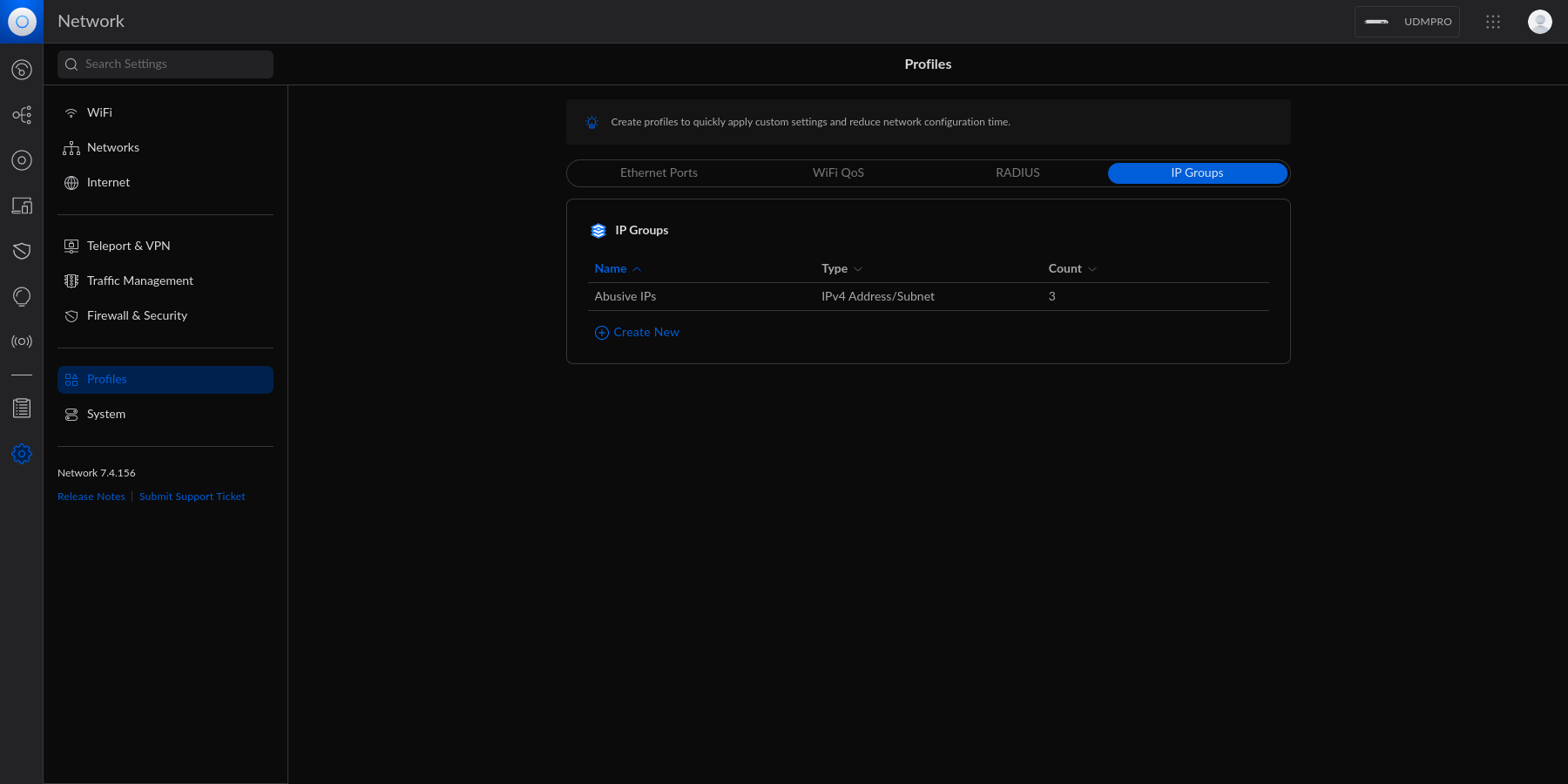 +#+title: Block IP Addresses and Subnets with the Unifi Network Firewall +#+date: 2023-06-18 + +** Identifying Abusive IPs +:PROPERTIES: +:CUSTOM_ID: identifying-abusive-ips +:END: +If you're like me and use Unifi network equipment at the edge of the +network you manage, you may know that Unifi is only somewhat decent at +identifying and blocking IPs that represent abusive or threat actors. + +While Unifi has a +[[https://help.ui.com/hc/en-us/articles/360006893234-UniFi-Gateway-Threat-Management][threat +management]] tool inside their Network application, it can be lacking in +functionality and identification. For example, I have my UDM Pro set to +identify and block almost all categories of threats available within the +Unifi settings. However, I regularly identify abusive actors on my web +server via the server logs. + +In addition, I have identified IP addresses and subnets directly within +Unifi's logs that the UDM did not block for whatever reason. + +This guide is meant to be another step in the process to manually block +abusive IP addresses or subnets that you have identified but are not +being automatically blocked yet. + +** Create an IP Group Profile +:PROPERTIES: +:CUSTOM_ID: create-an-ip-group-profile +:END: +To start, login to the Unifi machine's web GUI and navigate to the +Network app > Settings > Profiles. + +Within this page, choose the =IP Groups= tab and click =Create New=. + +#+caption: Network Profiles +[[https://img.cleberg.net/blog/20230618-unifi-ip-blocklist/unifi_profiles.png]] Each IP Group profile can be used as one of three options: @@ -39,39 +42,48 @@ Each IP Group profile can be used as one of three options: 2. IPv4 Address/Subnet 3. IPv6 Address/Subnet -In this example, I'm creating an IPv4 Address/Subnet group and adding a few -different IP addresses and a subnet. -Once you've added all IP addresses and subnets, click the `Apply` button -that should appear at the bottom. +In this example, I'm creating an IPv4 Address/Subnet group and adding a +few different IP addresses and a subnet. Once you've added all IP +addresses and subnets, click the =Apply= button that should appear at +the bottom. -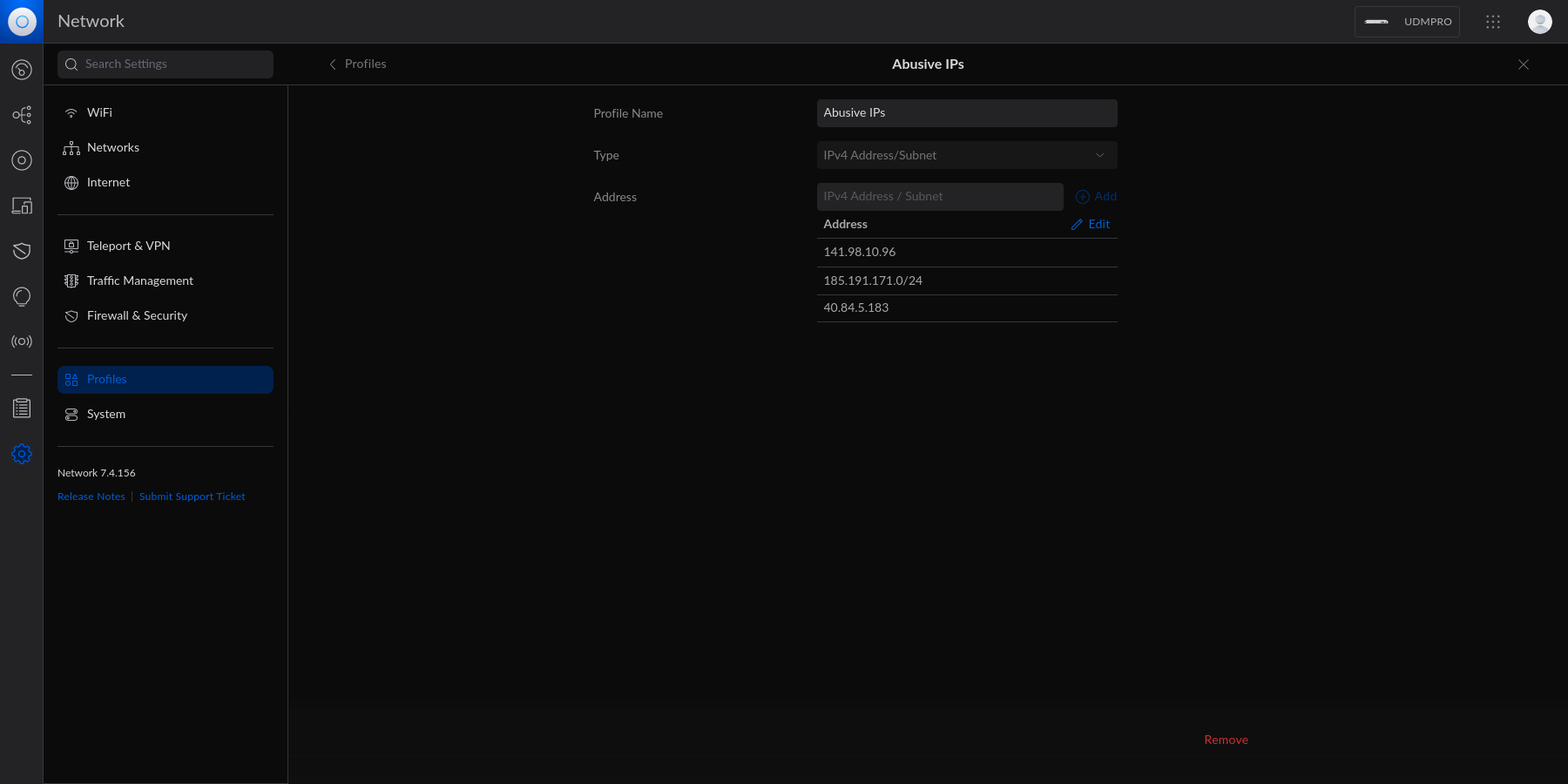 +#+caption: Network Profile IPs +[[https://img.cleberg.net/blog/20230618-unifi-ip-blocklist/abusive_ips.png]] -At this point, the IPv4 Address/Subnet has been created but not yet used. +At this point, the IPv4 Address/Subnet has been created but not yet +used. -## Drop IP Group Profile via the Unifi Firewall +** Drop IP Group Profile via the Unifi Firewall +:PROPERTIES: +:CUSTOM_ID: drop-ip-group-profile-via-the-unifi-firewall +:END: +To instruct the Unifi machine to block the profile we just created, we +need to navigate to the Network app > Settings > Firewall & Security. -To instruct the Unifi machine to block the profile we just created, we need -to navigate to the Network app > Settings > Firewall & Security. +Within this screen, find the Firewall Rules table and click +=Create Entry=. This entry should contain the following settings: -Within this screen, find the Firewall Rules table and click `Create Entry`. This -entry should contain the following settings: +- Type: =Internet In= +- Description: =<Your Custom Rule>= +- Rule Applied: =Before Predefined Rules= +- Action: =Drop= +- Source Type: =Port/IP Group= +- IPv4 Address Group: =<Name of the Group Profile You Created Above>= -- Type: `Internet In` -- Description: `<Your Custom Rule>` -- Rule Applied: `Before Predefined Rules` -- Action: `Drop` -- Source Type: `Port/IP Group` -- IPv4 Address Group: `<Name of the Group Profile You Created Above>` +Customize the remaining configurations to your liking, and then save and +enable the firewall rule. -Customize the remaining configurations to your liking, and then save and enable -the firewall rule. +#+caption: Firewall Rule +[[https://img.cleberg.net/blog/20230618-unifi-ip-blocklist/firewall_drop_rule.png]] -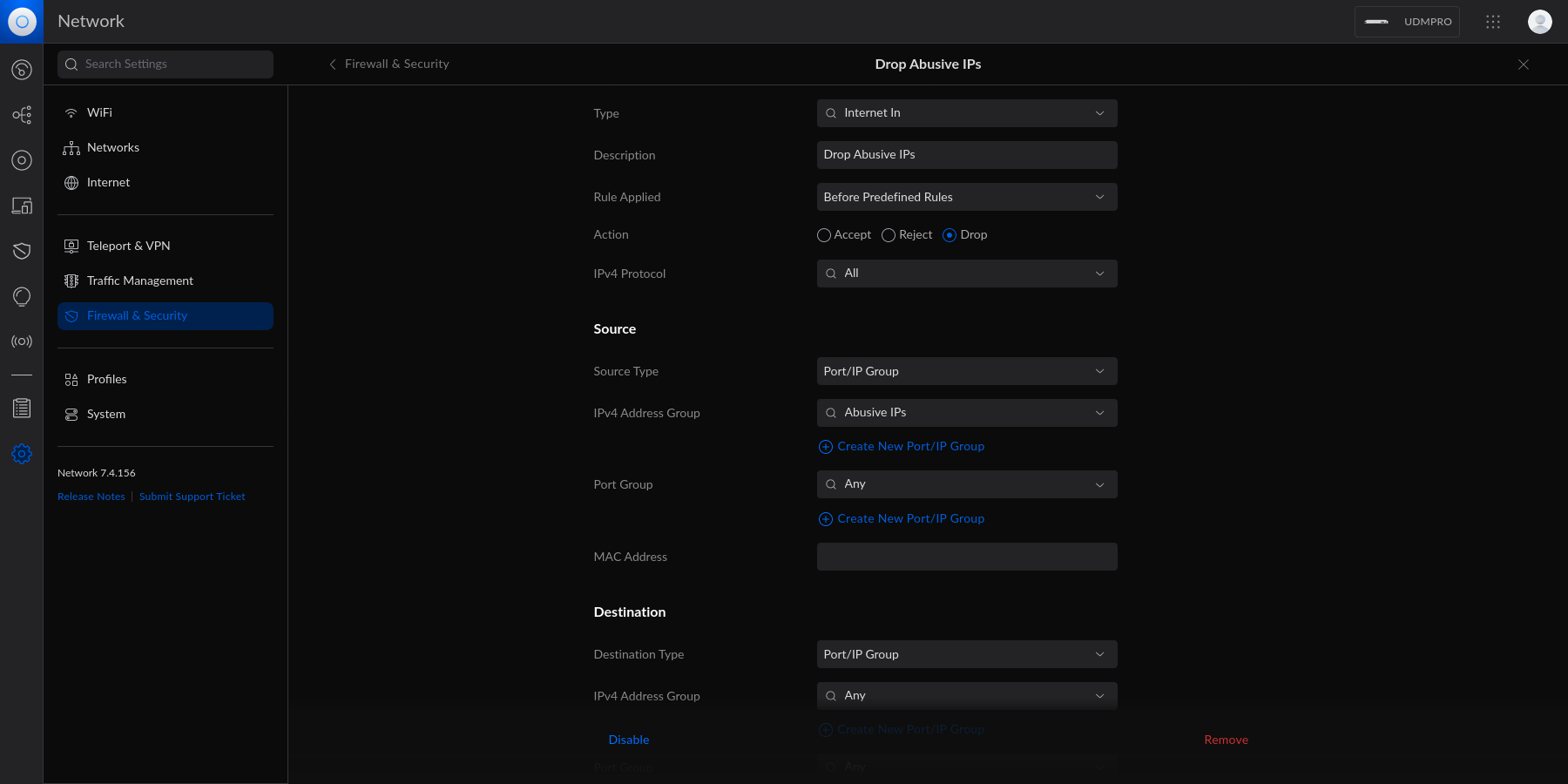 +Once enabled, the Unifi machine will be able to drop all incoming +connections from the defined IP addresses and subnets within the created +profile. -Once enabled, the Unifi machine will be able to drop all incoming connections -from the defined IP addresses and subnets within the created profile. +#+begin_quote +As a personal aside to this topic, I'm looking for a convenient way to +update the firewall rules or profiles remotely (within the LAN) from the +web server to accelerate this process. If you have an idea on how to +automatically update Unifi IP groups or firewall rules, let me know! -> As a personal aside to this topic, I'm looking for a convenient way to update -> the firewall rules or profiles remotely (within the LAN) from the web server -> to accelerate this process. If you have an idea on how to automatically update -> Unifi IP groups or firewall rules, let me know! +#+end_quote |